Loading…
sources · 1
Over the past few months, we’ve seen a resurgence of always-on agents.
Always-on agents are stateful and proactive, meaning they manage context across sessions and take actions without direct supervision. Underneath, they run on the same core loop as other agents. The difference is the surrounding architecture, which is built from primitives that control when the agents wake up, what carries over between runs, and how their work reaches the user.
The resurgence is largely due to recent model advancements, which have made always-on agents more practical to run. First, the latest models have better judgment: they’re more reliable at understanding user intent and knowing when to check in. Second, intelligence is becoming cheaper, with long-horizon tasks benefiting the most. For example, on one long-horizon coding benchmark, Opus 5.5 cost 78% less per solved task than Opus 5, compared with 40% less on typical workloads.
Customers have started to ask us how to integrate this type of experience into their own products. Some companies want to make their existing agents more proactive, while others are looking to build them from the ground up.
This post breaks down the primitives behind always-on agents and walks through how they fit together.
The cycle behind the always-on agent
An always-on agent is not actually “always on.” This is just a description of the user experience.
In reality, the agent spends most of its time asleep, waking up periodically to do work. Each stretch of work is called a run: the agent receives an event, completes its task, and then saves information about what happened. A run works inside a session, which is the transcript of messages and tool calls. Once the run is finished, the agent goes back to sleep, and the cycle repeats indefinitely.
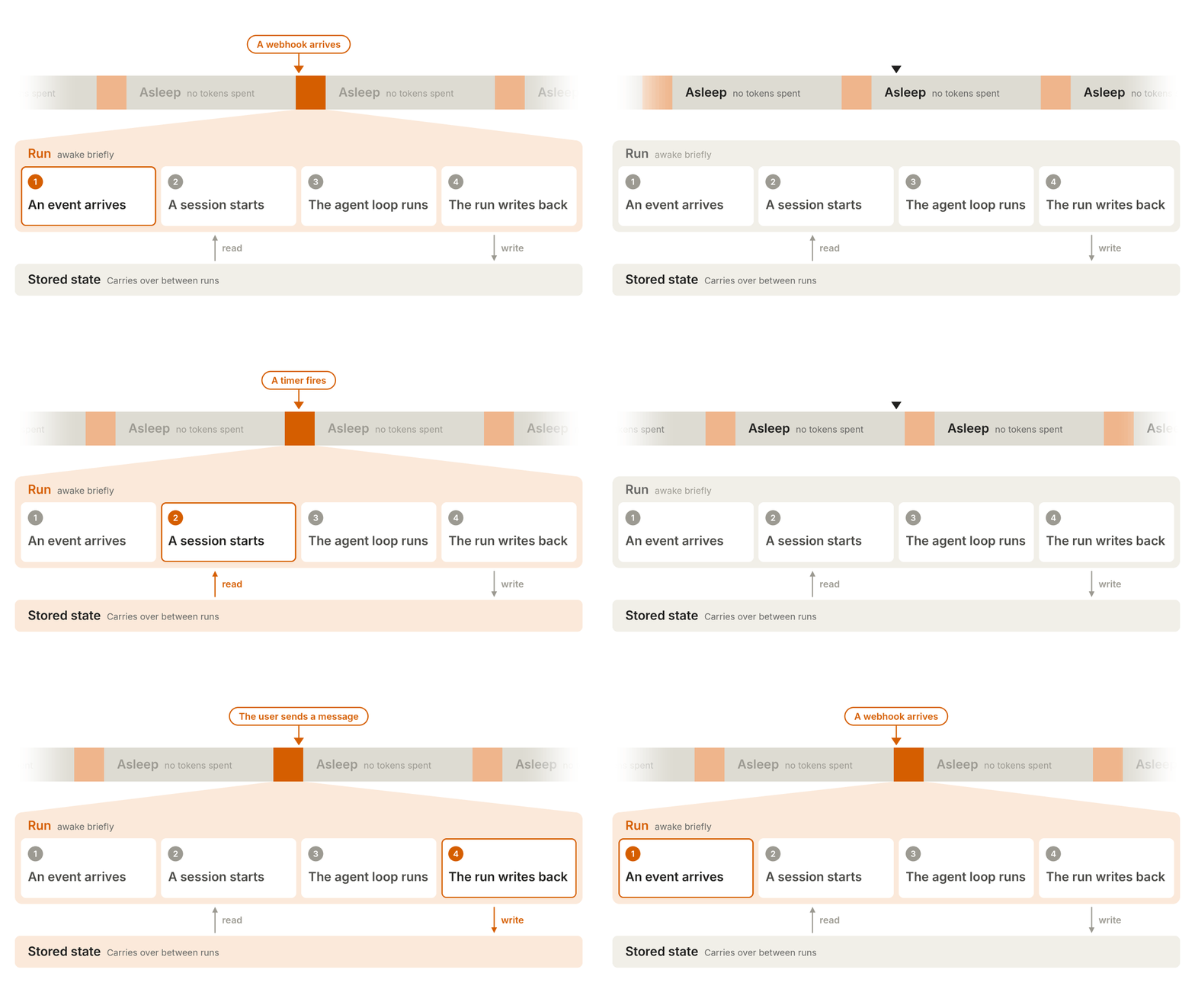
The core primitives
The surrounding architecture of an always-on agent has five core primitives: an event inbox, timers, memory, permissions, and an outbox. Let’s take a look at each.
Event inbox
Most AI agents only run when the user sends a message. In contrast, always-on agents can be triggered by many types of events, including webhooks, scheduled tasks, and background jobs.
One tempting approach is to have each event source call the agent directly, but that has a few failure modes. For example, two events arriving at the same time can start competing runs, and a crash can lose an event entirely.
This is where the event inbox comes in. Instead of calling the agent, every source sends an event to an inbox, where a worker picks it up.
The simplest version has three components:
- A durable list of events, usually a database table;
- A handler, usually an HTTP endpoint, that writes events to the list; and
- A worker, usually a background service, that reads from the list.
The inbox should track the status of each event, and events can be deduplicated based on unique identifiers from the source. A relational database works well for the inbox, with every event appended as a new row. We recommend starting with one inbox per user, but you can split this further if you need more parallelism.
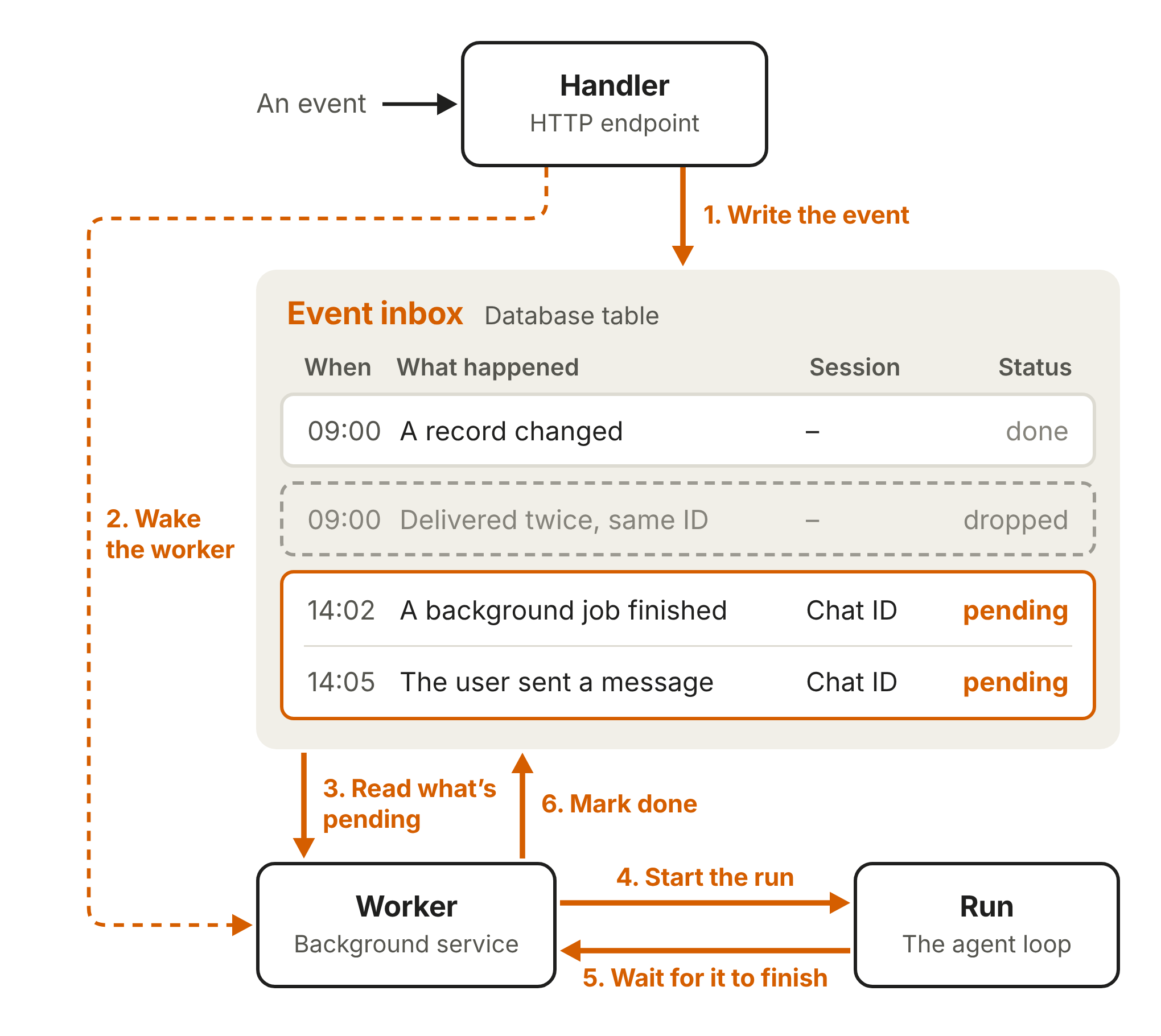
When a new event comes in, the handler writes the event to the inbox and wakes the worker. The worker reads whatever is pending and starts a run. Events that continue earlier work, such as a reply from the user, resume an existing session, while everything else starts a new session.
From there, the worker passes the events to the agent loop, waits for the run to finish, and marks the corresponding events as done. The implementation details can get tricky, so here are a few best practices:
- The handler should acknowledge events quickly. Some sources, such as webhook providers, treat slow responses as failures. The handler can still run lightweight checks, but any deeper verification, such as checking for prompt injection, should be done during the run.
- The inbox should be the source of truth. When the worker is woken up, it should pull the latest events from the inbox first. That way, if the worker dies mid-run, a new one can pick up the same event and retry.
- An inbox should only have one active worker at a time. This prevents two runs from duplicating work or overwriting each other. When a new event shows up mid-run, you can either push it to the next run, fold it into the current run, or interrupt and restart.
- The worker should batch pending events together. For example, if the user sends several messages in a row, the worker can merge them into a single run, so the agent only needs to reply once.
Timers
Together with the event inbox, timers let always-on agents be proactive. Timers generally fall into one of two categories: follow-ups or schedules. A follow-up is a deadline that the agent sets for itself, such as checking in on a reply. A schedule, on the other hand, is a recurring task that happens on a known cadence, such as a daily newsletter.
Timers live in their own durable store, usually another database table, separate from the inbox. The inbox should only hold events that are ready to be worked on. A follow-up and a schedule can share a similar schema, but a schedule needs to track its recurrence as well.
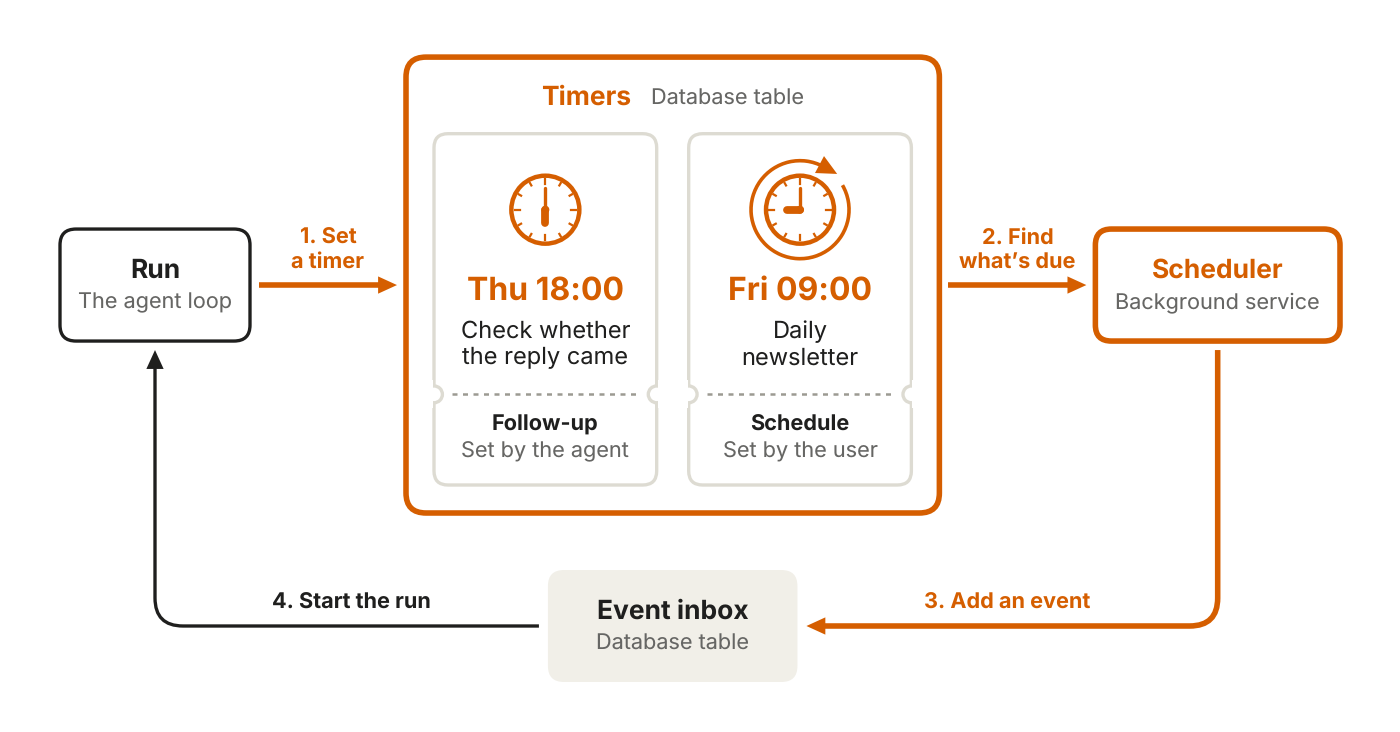
A timer doesn’t initiate a run on its own. Instead, a scheduler, usually a background service, polls the store at a fixed interval and fires anything that’s due. On each pass, the scheduler:
-
Scans the store and finds timers that are due.
-
Updates each timer based on its category. A follow-up should be marked as done.
-
A schedule should get its due time updated to the next occurrence.
-
Adds an event to the inbox and wakes the worker.
For the scheduler, you can either build your own service or use a durable execution engine.
Memory
Always-on agents work across many disjointed runs and rely on memory to maintain continuity.
Similar to the event inbox and timers, memory should have its own store. In our products, such as Claude Code’s auto memory and the Messages API’s memory tool, this is implemented as a directory of files. For an always-on agent, the directories should map to durable storage, usually a database or an object store. This way memories outlive the worker.
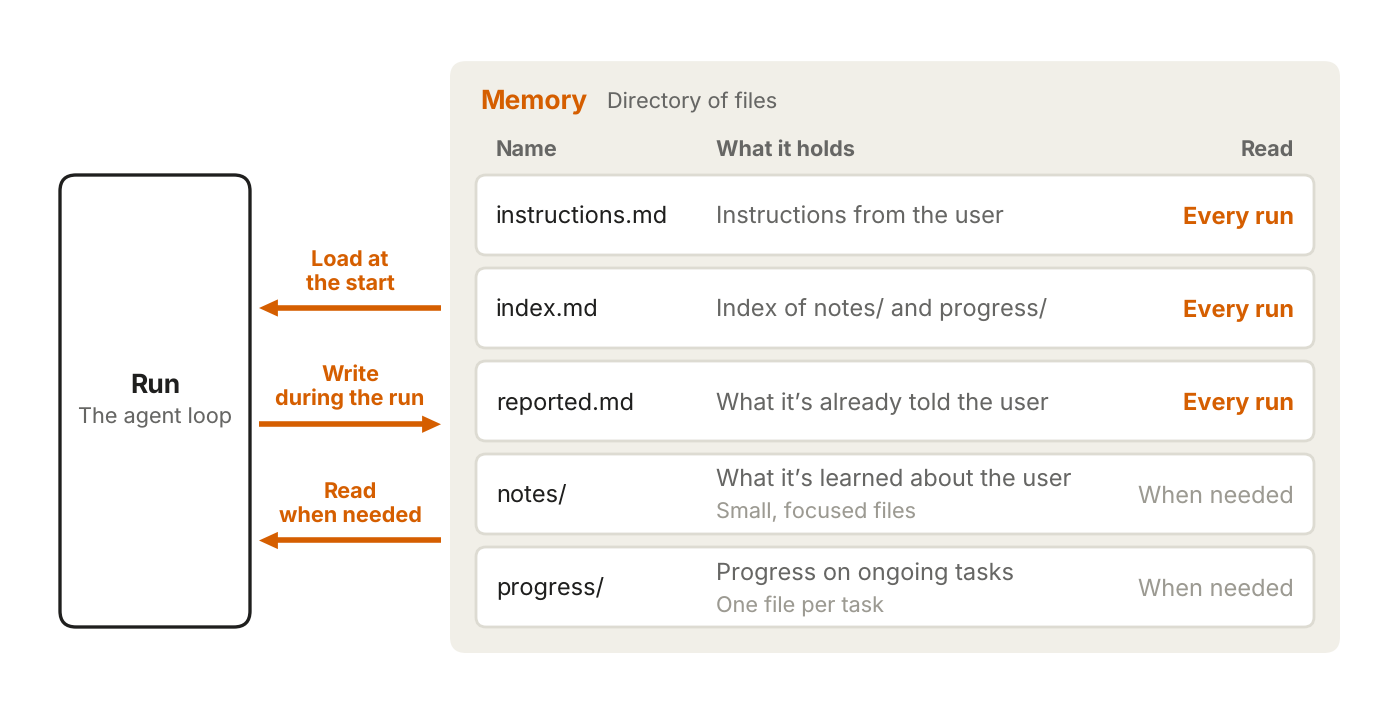
As a rule of thumb, memory should only hold what the agent can’t look up again. If something already lives in another system, such as an issue tracker, you should save a pointer instead. Here is a breakdown of the types of memory an always-on agent should store:
- User instructions: Any instructions from the user about agent behavior should be saved in their own file and loaded at the start of every run. The user won’t always be around to steer the agent, so the instructions have to carry over between runs.
- User notes: The agent should save what it’s learned about the user, such as their role, their preferences, or any corrections they’ve given. You can start with one file and move to several small files as the notes grow. In the latter case, only an index is loaded at the start of each run, but the agent can pull the individual files into context when it needs more details.
- Past messages: The agent should keep track of what it’s already told the user so nothing is repeated. It can either store this in a separate file that’s loaded at the start of each run, or have the worker load the agent’s last few messages with the user.
- Task progress: For each ongoing task, the agent should keep a progress file that covers what’s been done and what’s left. Any new run can then read that file and pick up where the previous run left off. Similar to user notes, only an index is loaded at the start of each run, but the agent can pull the individual files into context when it needs more details.
The diagram below shows one example setup.
All of the above describes memory that’s saved during a run. You can also add dreaming, which reviews past sessions to curate memories. Dreaming can replace outdated entries and find patterns that only show up across many runs. If you’re interested in learning more, our post on agent memory covers this in more detail.
Inside the context window
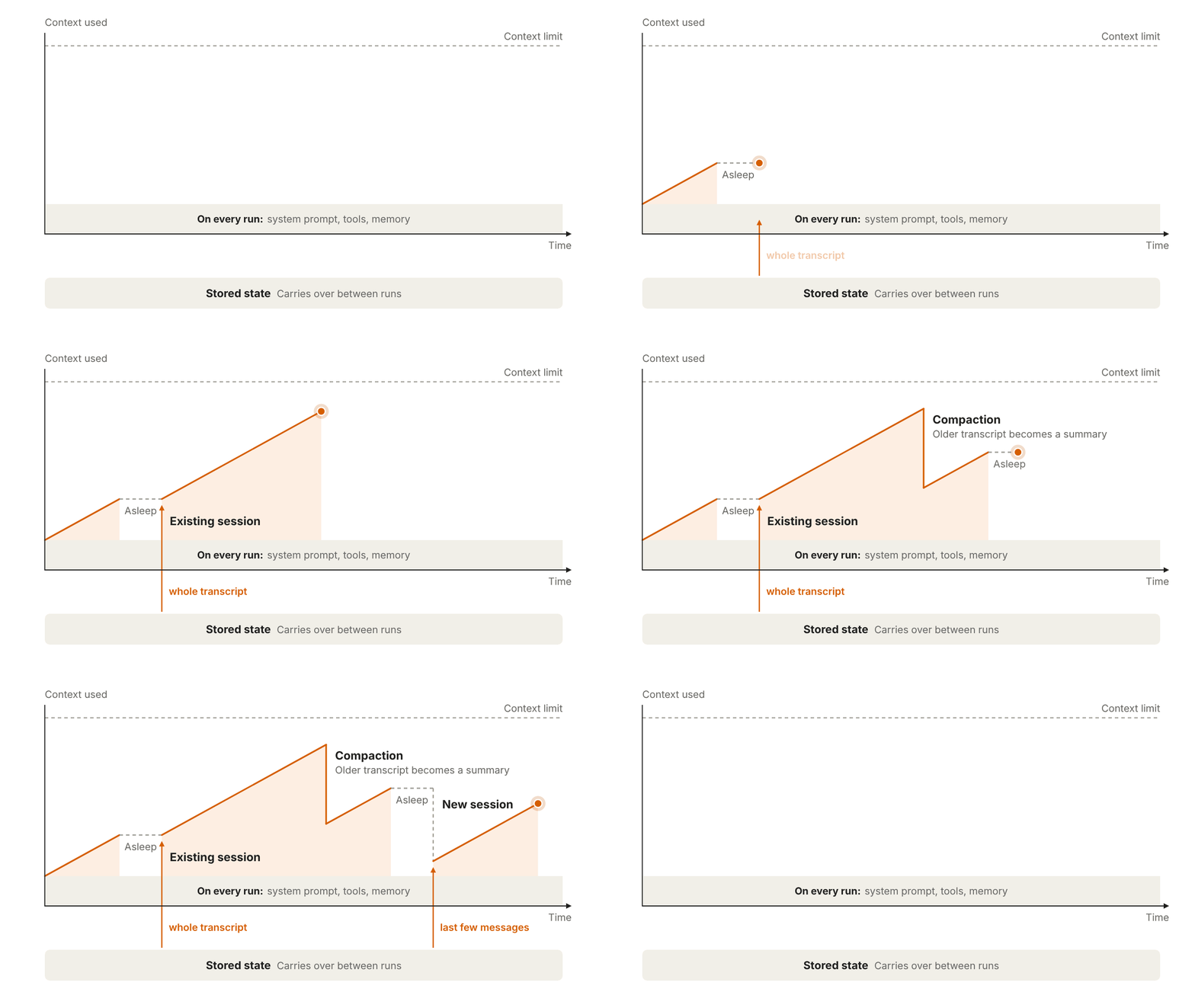
Before doing any work, the agent loads the system prompt, tool definitions, and memory files. This initial context “overhead” is included in every run, so we recommend keeping it lean and using prompt caching to lower costs.
A new session starts only with this context overhead and the events that triggered the run. An existing session, on the other hand, brings back the messages and tool calls from its earlier runs.
If a session becomes too long, you can either compact the older messages or start a new session. Both approaches lose detail, so anything that needs to persist should be saved to memory along the way.
Permissions
Permissions are where always-on agents carry the most risk. A run holds the user’s access and, by design, operates unattended. For each tool call, the agent needs to decide whether to proceed on its own, block it, or wait for approval.
The components for permissions are the same ones other agents use:
- Credential store: Always-on agents often need sensitive user credentials like passwords or access tokens to be useful. The recommended pattern is a proxy outside the agent’s environment that adds credentials to outgoing requests. The agent sends requests without credentials, and the proxy injects the real credentials before forwarding.
- Auto mode: An always-on agent should be able to work without constant user input. We’ve already tackled a version of this problem with auto mode in Claude Code. Auto mode uses classifiers to review higher-risk actions and block the ones they identify as dangerous so Claude can find a safer approach. User review, however, is still necessary for the most important decisions.
- Deferred tool calls: In Claude Code, a hook can defer a tool call and wait for additional input from the user. The same pattern applies to always-on agents, which may need clarification or approval before taking certain actions. When a call is deferred, the run ends and the session is saved mid-call. The request is shown to the user (e.g., through an interactive card built with MCP Apps), and their answer comes back as an event in the inbox. That event starts a new run, which resumes the saved session with the user’s input. While the deferred call waits for a response, the worker can pick up other events, so the agent isn’t blocked.
Outbox
With most AI agents, the response is streamed to the user as it’s generated, so they can follow along as Claude reasons through the problem, calls tools, and writes its answer.
Always-on agents, on the other hand, do most of their work in the background. The user gets the outcome and a few details, rather than the entire step-by-step breakdown.
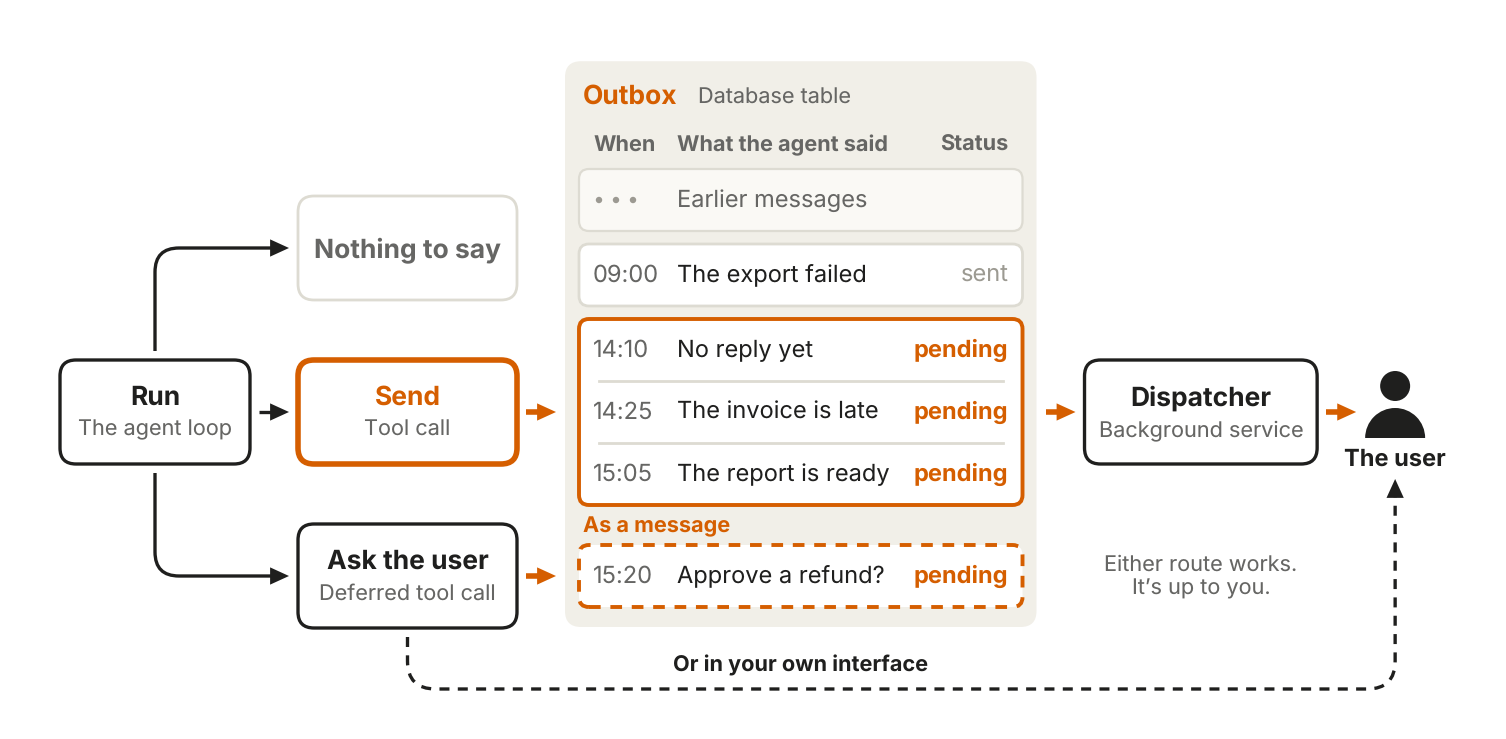
A run can end in one of three ways:
- The agent sends a message to the outbox,
- The agent decides that nothing needs to be sent, or
- The agent uses a deferred tool call to request permission or additional input.
Most always-on agents can get by with a “send” tool that delivers the message directly to the user. You only need a formal outbox when you want to pace your agent’s messages or allow your agent to recover from errors.
The outbox is a separate table of outgoing messages, analogous to the event inbox. There’s also a dispatcher, usually a background service, that’s analogous to the worker. The dispatcher reads the pending messages, decides what to deliver, and sends those to the user. A request from a deferred tool call can either go through the outbox or be shown directly in the interface.
Beyond delivery, it’s important to tune how many messages the agent sends. An agent that sends too many becomes noisy, while an agent that doesn’t send enough misses things that the user needs to know. We recommend building evals to find the right balance. In practice, it’s better for the agent to start quiet and then earn more of the user’s attention over time.
How everything fits together
Here is how the five primitives fit together:
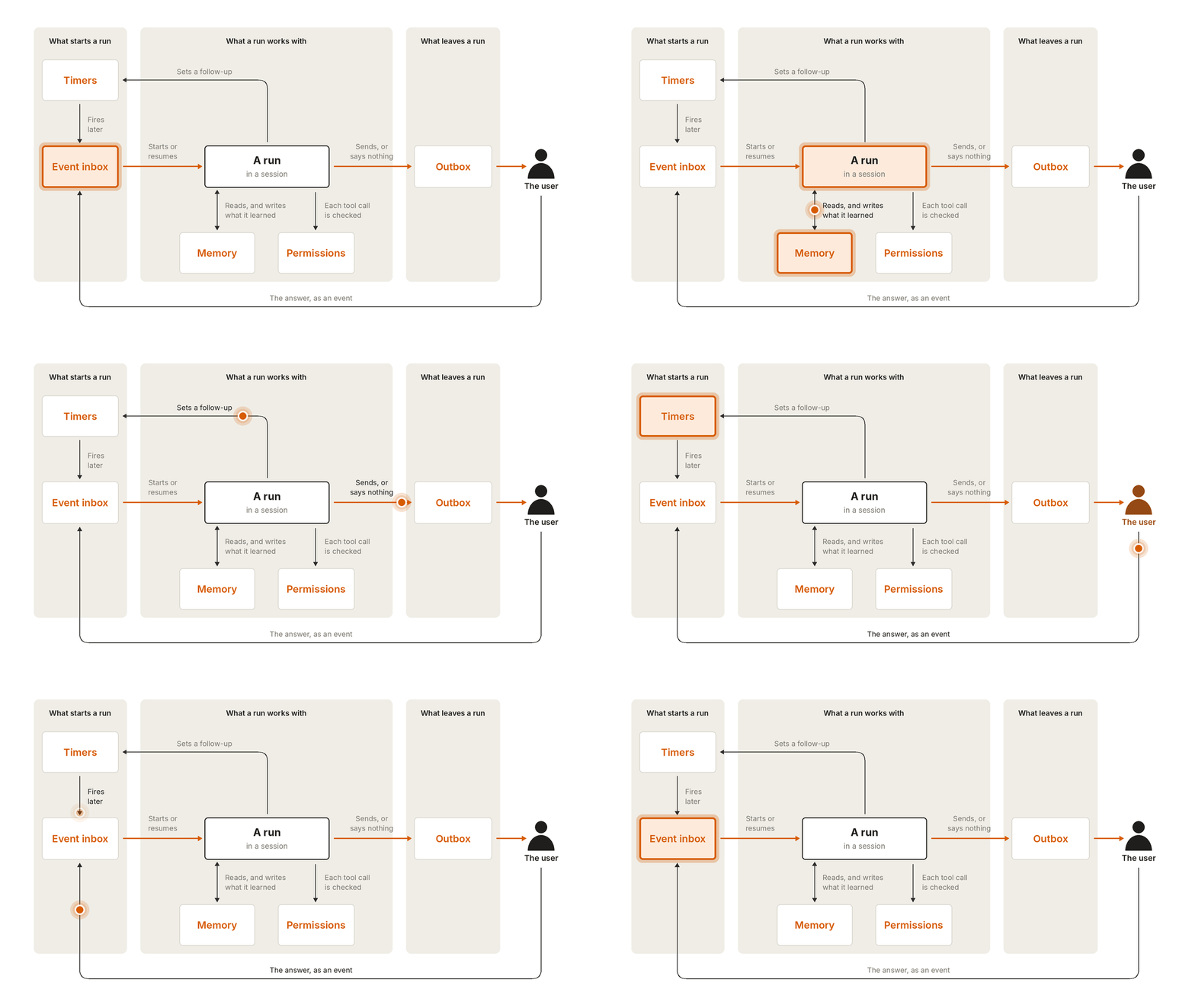
Every run starts with an event from the inbox, whether it’s a user message, a webhook, or a timer. When the worker picks up an event, it kicks off a run and wakes the agent in a new or existing session. The agent reads its memory to get a baseline, works within its permissions to take actions, and then updates its memory with anything it has learned. Once the run is finished, the agent pushes a row to the outbox, and the dispatcher delivers the message to the user.
Together, these form a cycle. A run can set a timer that wakes the agent again later, and when the user replies to a message, their answer comes back as an event in the inbox. Each run is brief, but the cycle keeps going indefinitely, and that’s what makes the agent feel like it’s always on.
Acknowledgements
Written by William Hu. Special thanks to Rodrigo Olivares and Michael Segner for their contributions.