This article presents practical patterns for building effective agentic systems with large language models (LLMs), drawn from Anthropic's guidance and production experience across dozens of teams and industries. The most successful implementations did not rely on complex frameworks or specialized libraries, but on simple, composable patterns. The core guidance: success is not about the most sophisticated system but the right system for your needs — start with simple prompts, optimize them with comprehensive evaluation, and add multi-step agentic systems only when simpler solutions fall short.
It distinguishes between workflows (predefined code paths orchestrating LLM calls) and agents (systems where LLMs dynamically direct their own processes). The core building block is the augmented LLM (with retrieval, tools, and memory) and the Model Context Protocol (MCP) is one route to augmenting it. Several reusable workflow patterns are described — prompt chaining, routing, parallelization, orchestrator-workers, and evaluator-optimizer — along with guidance on when each is appropriate. The article also discusses when to use (and not use) agents and frameworks, and includes two appendices: "Agents in Practice" (customer support and coding agents) and "Prompt engineering your tools."
(Note added later: much of the tooling landscape described has changed since December 2024; the current approach is covered in "how we built Claude Managed Agents" and the Managed Agents documentation.)
Key Points
Prefer the simplest solution; agentic systems add latency and cost for better task performance, so only use them when the trade-off is justified — which may mean not building agentic systems at all.
Workflows (predictable, code-defined paths) suit well-defined tasks; agents (model-driven, dynamic control) suit flexible, complex tasks at scale. Anthropic groups both under agentic systems.
For many applications, optimizing single LLM calls with retrieval and in-context examples is usually enough.
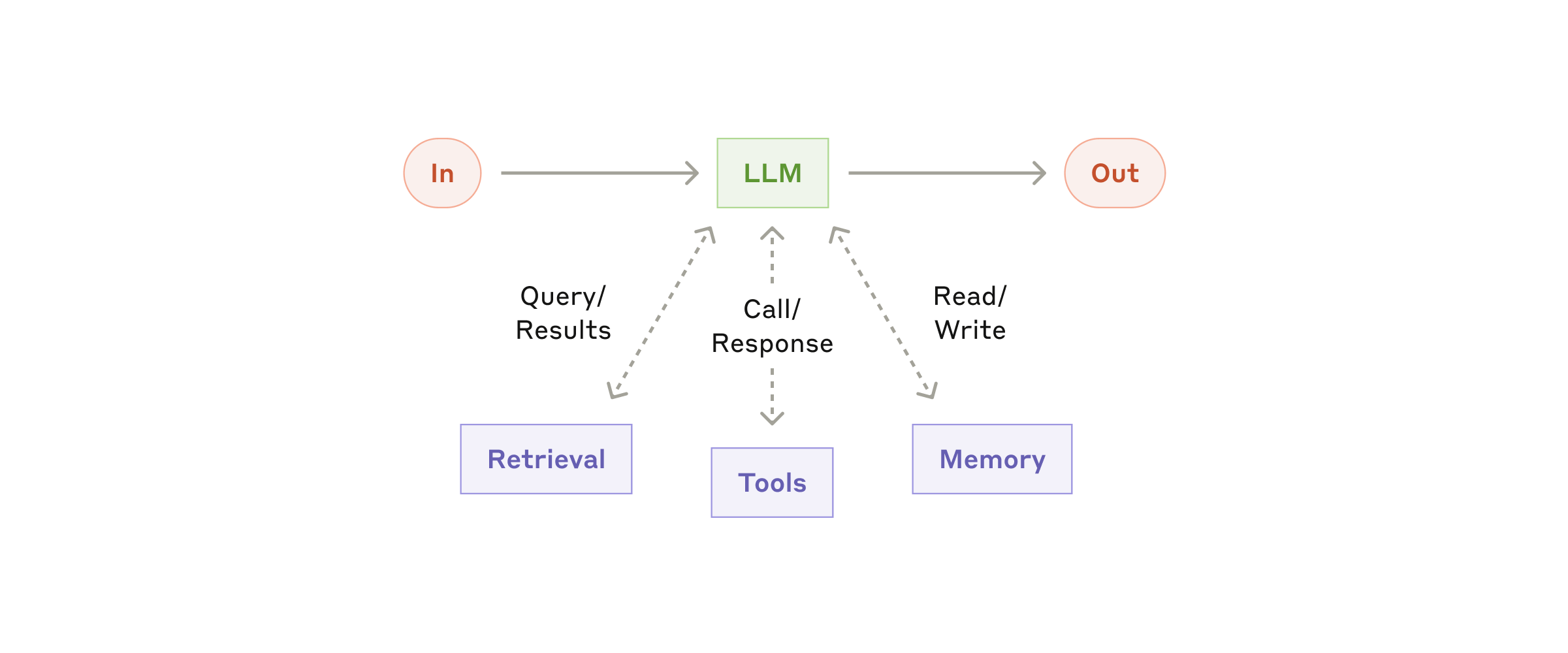
The foundational building block is the augmented LLM: a language model enhanced with retrieval, tools, and memory.
Five reusable workflow patterns cover most production needs: prompt chaining, routing, parallelization, orchestrator-workers, and evaluator-optimizer. They are not prescriptive building blocks — shape and combine them per use case, measuring performance and iterating. Add complexity when it demonstrably improves outcomes.
only
Start with direct LLM API calls before adopting frameworks; if using a framework, understand the underlying code to avoid debugging difficulty.
Three core principles: maintain simplicity in the agent's design; prioritize transparency by explicitly showing the agent's planning steps; carefully craft the agent-computer interface (ACI) through thorough tool documentation and testing.
Frameworks help you start quickly, but don't hesitate to reduce abstraction layers and build with basic components as you move to production.
Concepts
Definitions. "Agent" is defined variously across teams: some mean fully autonomous systems operating independently over extended periods with various tools to accomplish complex tasks; others mean more prescriptive implementations following predefined workflows. Anthropic's architectural distinction is workflows versus agents.
Augmented LLM: An LLM enhanced with capabilities such as retrieval, tool-use, and memory, allowing it to autonomously search, select tools, and retain information. Current models actively use these capabilities — generating their own search queries, selecting appropriate tools, and determining what information to retain. Two focus areas: tailoring capabilities to the specific use case, and giving the LLM an easy, well-documented interface. The Model Context Protocol (MCP) is one implementation route, letting developers integrate with a growing ecosystem of third-party tools via a simple client.
Prompt chaining: Decomposing a task into a sequence of LLM calls where each step processes the output of the previous one, often with programmatic checks ("gates") on intermediate steps.
Routing: Classifying an input and directing it to a specialized follow-up task or prompt, enabling separation of concerns and more specialized prompts; without it, optimizing for one kind of input can hurt performance on others.
Parallelization: Running multiple LLM calls simultaneously, either by splitting a task into independent subtasks (sectioning) or by running the same task multiple times for diverse outputs (voting).
Orchestrator-workers: A central LLM dynamically breaks down tasks, delegates them to worker LLMs, and synthesizes results.
Evaluator-optimizer: One LLM generates a response while another provides evaluation and feedback in a loop for iterative refinement.
Agent: An LLM that uses tools based on environmental feedback in a loop, operating autonomously (with possible human checkpoints) to accomplish complex tasks.
Details
The Augmented LLM (Building Block)
Every agentic system begins with an LLM that can actively use augmentations — retrieval (search queries), tool selection, and memory. Implementations should carefully tailor these capabilities to the use case and expose a well-documented interface. The Model Context Protocol (MCP) is one approach to integrate a growing ecosystem of third-party tools with a simple client. All subsequent workflow patterns assume each LLM call has access to these augmentations.
Rendering diagram…
Workflow Patterns
Prompt Chaining
A task is broken into fixed steps; each step's output becomes the next step's input. Programmatic checks can validate intermediate results (e.g., an outline must meet criteria before generating the full document). Use when: the task can be cleanly decomposed into fixed subtasks and higher accuracy justifies the latency of multiple calls — each call becomes easier. Examples: generating marketing copy then translating it; writing a document outline, verifying it, then writing the full text.
Routing
An LLM (or traditional classifier) categorizes an input and routes it to a specialized handler (different prompt, toolset, or model), separating concerns so that optimizing for one input type does not degrade others. Classification can be done by an LLM or a more traditional classification model/algorithm. Use when: there are distinct categories that benefit from separate handling and classification is accurate. Examples: customer service queries split by type (general, refund, support); using a cheaper model for common questions and a capable model for complex ones — e.g., routing easy/common questions to smaller cost-efficient models like Claude Haiku 4.5 and hard/unusual questions to more capable models like Claude Sonnet 4.5.
Parallelization
Two variations:
Sectioning: A task is divided into independent subtasks processed in parallel and aggregated.
Voting: The same task is run multiple times to obtain diverse outputs, then combined (e.g., by majority vote). Use when: subtasks are independent and parallel speedup is valuable, or when multiple perspectives improve confidence. For complex tasks with multiple considerations, LLMs generally perform better when each consideration gets a separate LLM call. Examples: sectioning — guardrails (one LLM processes query, another screens for inappropriate content); evals (separate LLM calls for each evaluation dimension). Voting — code vulnerability review with multiple prompts; content moderation with different thresholds.
Orchestrator-Workers
A central orchestrator LLM decides how to break a task into subtasks, delegates them to worker LLMs, and synthesizes their outputs. Unlike parallelization, subtasks are not pre-defined but dynamically determined per input. Use when: you cannot predict the subtasks in advance (e.g., coding tasks where the number and nature of file changes depend on the request). Examples: coding assistants that modify multiple files in one session; complex search that gathers and cross-references information from many sources.
Evaluator-Optimizer
One LLM generates a response; a second LLM evaluates it and provides feedback, enabling iterative improvement in a loop. The evaluator may decide whether further iterations are needed. Use when: clear evaluation criteria exist and iterative refinement demonstrably improves output (like human editing). Examples: literary translation where the evaluator catches nuance; complex search tasks needing multiple rounds of querying and analysis.
Agents
An agent is an LLM that, after an initial command or discussion with a user, plans and operates autonomously. It iteratively uses tools, observes results (ground truth from the environment), and decides next steps. Human feedback can be requested at checkpoints. Stopping conditions (e.g., max iterations) maintain control.
Implementation is typically simple — an LLM using tools in a loop. Success depends on carefully designing the toolset and tool documentation. When to use: tasks that require flexibility, multi-step reasoning, and tool use where the exact path cannot be predetermined. Examples: open-ended research assistants, multi-file coding agents, complex data analysis pipelines, and a "computer use" reference implementation where Claude uses a computer to accomplish tasks.
When (Not) to Use Agents
Start simple: often a single LLM call with retrieval and in-context examples is sufficient. Workflows add predictability and consistency for well-defined tasks; agents add flexibility and model-driven decision-making for dynamic tasks. If the task does not benefit from model-driven decision-making, avoid agents. Examples cited for the patterns include a coding agent that resolves SWE-bench tasks (edits to many files based on a task description).
Frameworks
Frameworks that ease implementation include the Claude Agent SDK; Strands Agents SDK by AWS; Rivet, a drag-and-drop GUI LLM workflow builder; and Vellum, another GUI tool for building and testing complex workflows. They simplify low-level tasks — calling LLMs, defining and parsing tools, chaining calls — but their abstraction layers often obscure the underlying prompts and responses, making debugging harder, and they tempt developers toward complexity when a simpler setup would suffice. Recommendation: start with LLM APIs directly, since many patterns take only a few lines of code; if you do use a framework, understand the underlying code, because incorrect assumptions about what's under the hood are a common source of customer error. Sample implementations are in the cookbook (patterns-agents-basic-workflows).
Combining and Customizing These Patterns
These building blocks aren’t prescriptive. They are common patterns that developers can shape and combine to fit different use cases. Success depends on measuring performance and iterating on implementations. Add complexity only when it demonstrably improves outcomes.
Core Principles for Implementing Agents
When implementing agents, follow these three principles:
Maintain simplicity in the agent’s design.
Prioritize transparency by explicitly showing the agent’s planning steps.
Carefully craft your agent-computer interface (ACI) through thorough tool documentation and testing.
Frameworks can help you start quickly, but as you move to production, reduce abstraction layers and build with basic components. These principles create agents that are powerful, reliable, maintainable, and trusted.
Appendix 1: Agents in Practice
Two particularly promising applications demonstrate the practical value of the patterns above. Both require conversation and action, have clear success criteria, enable feedback loops, and integrate meaningful human oversight.
A. Customer Support
Customer support combines familiar chatbot interfaces with tool integration. It is a natural fit for open‑ended agents because:
Support interactions follow a conversational flow while requiring external information and actions.
Tools can pull customer data, order history, and knowledge base articles.
Actions such as issuing refunds or updating tickets can be handled programmatically.
Success can be clearly measured through user‑defined resolutions.
Several companies have validated this approach through usage‑based pricing models that charge only for successful resolutions, showing confidence in their agents' effectiveness.
B. Coding Agents
Code agents have evolved from completion to autonomous problem‑solving. They are effective because:
Code solutions are verifiable through automated tests.
Agents can iterate using test results as feedback.
The problem space is well‑defined and structured.
Output quality can be measured objectively.
In Anthropic’s own implementation, agents solve real GitHub issues in the SWE‑bench Verified benchmark based solely on the pull request description. Automated testing helps verify functionality, but human review remains crucial for ensuring solutions align with broader system requirements.
Appendix 2: Prompt Engineering Your Tools
Tools enable Claude to interact with external services and APIs by specifying their exact structure and definition in the API; when Claude plans to invoke a tool, its response includes a tool use block. Tool definitions and specifications deserve as much prompt engineering attention as your overall prompts.
Choosing Tool Formats
Several ways exist to specify the same action (e.g., writing a diff vs. rewriting the entire file; returning code in markdown vs. JSON). Such differences are cosmetic and losslessly convertible, but some formats are much harder for an LLM to produce — writing a diff requires knowing how many lines are changing in the chunk header before writing the new code, and writing code inside JSON (versus markdown) requires extra escaping of newlines and quotes. Suggestions:
Give the model enough tokens to “think” before it writes itself into a corner.
Keep the format close to what the model has seen naturally in text on the internet.
Avoid formatting “overhead” such as counting thousands of lines of code or string‑escaping code.
Designing the Agent‑Computer Interface (ACI)
Invest as much effort in ACI as in human‑computer interfaces (HCI). Recommendations:
Put yourself in the model’s shoes: is it obvious how to use the tool from its description and parameters? Good tool definitions include example usage, edge cases, input format requirements, and clear boundaries from other tools.
Change parameter names or descriptions to make things more obvious — treat it like writing a great docstring for a junior developer, especially when there are many similar tools.
Test how the model uses your tools by running many example inputs (e.g., in the workbench) and iterating.
Poka‑yoke your tools: change arguments to make mistakes harder.
For example, while building the SWE‑bench agent, Anthropic spent more time optimizing tools than the overall prompt. The model made mistakes with relative filepaths after moving out of the root directory. Changing the tool to always require absolute filepaths eliminated the errors.
Acknowledgements: written by Erik S. and Barry Zhang, drawing on Anthropic's experience building agents and customer insights.